A checklist for your first AI livestream
Nine things worth having ready before your first AI-hosted stream, from product data and consent paperwork to the questions to ask in your own chat.
Setting up a Genpio stream takes under ten minutes. Being ready for one takes a little longer, and the difference shows up in the first hour of selling.
This is the list we walk new accounts through. Work through it before you go live rather than during.
1. Decide what this stream is for
"Sell more" is not a target you can read off a dashboard afterwards. Pick one: clear specific stock, launch one product, run a channel overnight while your team sleeps, or test whether a market that speaks a language you do not speak buys from you at all. The setup differs for each.
2. Get your product data into a state you would be happy to read aloud
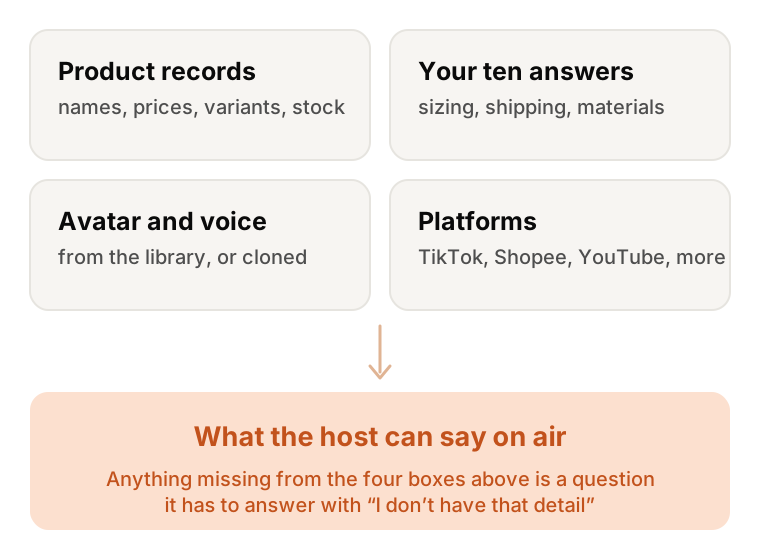
The host answers from the catalogue you load, so the catalogue is the script. Names, prices, variants, stock, shipping times, return policy. If a field is missing, the host will say it does not have that information, which is the correct behaviour and still a bad viewing experience.
Spend the hour here. It is the single highest-leverage thing on this list.
3. Write down the ten questions you get asked constantly
Every seller has them: sizing, shipping to a particular country, what it is made of, whether it works with something else. Load the answers with your products. You will use these in step 8 too.
4. Sort out consent before you clone anyone
Cloning a face or a voice requires the consent of the person it belongs to, and that includes you. If the avatar is going to be a founder, an employee or a partner creator, get it in writing before the recording session rather than after the stream is scheduled. A short sample is enough for the voice, so the paperwork usually takes longer than the recording.
If you would rather not clone anyone, the stock avatars and the 600+ localized voices are there and need no paperwork.
5. Pick your platforms, then check their rules yourself
Genpio can stream to 32 platforms at once, TikTok, YouTube, Instagram, Shopee and Whatnot among them. Each of those has its own policy on AI-generated hosts, disclosure, and what you are allowed to sell. Those policies change. Read the current version for the platforms you care about, and disclose where they ask you to. This is your obligation, not something a tool can take off your hands.
6. Choose the languages, not just the language
Adding a language costs you nothing per stream, but it does change who shows up. If you add Vietnamese, be ready to ship to Vietnam and to answer a Vietnamese customer service email on Monday. Pick languages you can actually service.
7. Size your plan against hours, not against seats
Plans are priced by the stream hour, so the number that matters is hours. Estimate honestly: a channel running overnight is not eight hours a week, it is fifty. Sizing storage, avatars, voices and products comes after that and is easier.
8. Ask your own awkward questions in your own chat
This is the step people skip. Once the stream is live, go into the chat as a viewer and ask the ten questions from step 3, plus two you know the catalogue does not answer. Watch what the host says. Replies come back in a fraction of a second, so you can do the whole set in a few minutes.
You are checking two things: that the answers are right, and that being told "I don't have that detail" sounds acceptable in your brand's voice.
9. Book a demo before you commit
There is no trial, free or paid. Book a demo instead: seeing it run on your own catalogue tells you more than any generic walkthrough.
After the first hour
Look at three things: which products got asked about that you did not expect, which questions the host could not answer, and where in the hour viewers dropped off. The first two are catalogue work, and they compound. The third is usually a pacing problem you can fix by reordering products.
The stream will run all night without you. The first hour is the one worth watching closely.